
10-Gigabit High-Speed Multi-WAN Wi-Fi 7 (be model) Security VPN Routers
Apart from the Gigabit Ethernet WAN port (P1) for broadband services that use an Ethernet interface (such as UFB in New Zealand or FTTP, FTTC, HFC, Satellite, and Fixed Wireless in Australia), all models feature a triple-combo port with two additional WAN options: a 10GbE SFP+ WAN slot (P2), a 10GbE Ethernet WAN/LAN port (P3), and a 10GbE SFP+ LAN slot (P4). Any two of these three ports can be used simultaneously, and port P3 can also be configured as a high-speed LAN port when not serving as the WAN. The 2.5GbE port (P5) can also be used as either a LAN or WAN interface. 4G LTE connectivity is also featured (via an attached 4G USB modem), and Wireless WAN (be model); all WAN interfaces can be configured for use in Load Balance mode or Failover mode.
The Vigor2928be features 802.11be (Wi-Fi 7, BE7200) with 4×4 MIMO (1376 Mbps for the 2.4 GHz band and 5765 Mbps for the 5 GHz band).
Equipped with Object-based SPI Firewall, Content Security Management (CSM), URL/IP Reputation and Port Knocking, IPv6, 50 simultaneous IPsec/OpenVPN/WireGuard VPN tunnels, Tag-based VLAN, multiple subnets and a set of traffic management features, these routers are an excellent choice for SMB.
Central Management features provide a centralised console to manage networks, including Virtual AP Controller to configure and manage up to 20 DrayTek wireless Access Points, and Virtual Switch Controller to configure and manage up to 10 DrayTek switches.
These routers can be mounted using a 1RU rack-mount bracket (DR101) on a standard 19” rack or cabinet.
Interface

*You can use only two ports at a time from P2 to P4. Also, P2 and P3 cannot both be configured as WAN ports simultaneously.
- 2x Wi-Fi Antenna (External)
1x Wi-Fi Antenna (Internal) - Reset Button
- LED Indicator
- 2x USB 2.0
- Fixed WAN Port: 1x GbE RJ-45
- Fixed WAN Port: 1x 10GbE SFP+*
- WAN/LAN Switchable Port: 1x 10GbE RJ-45*
- Fixed LAN Port: 1x 10GbE SFP+*
- Fixed LAN Port: 1x 2.5GbE RJ-45
- Fixed LAN Port: 3x GbE RJ-45
- Power On/Off Switch
- Power Input
*Only two of these ports can be active at the same time, and P2 & P3 cannot both act as WAN
Key Features

Wi-Fi 7 (be model only)
Features enhanced OFDMA and Multi-Link Operation (MLO) technologies to improve wireless efficiency and performance.

10G SFP+

10GbE
Provides ultra-fast 10G connectivity to meet the needs of high-demand network.

2.5GbE
Provides higher performance to Wi-Fi 6 AP and other Ethernet devices.

Load Balancing
Maximize throughput and reliability by using multiple Internet connections. Learn more

Bandwidth Management
Prevent one device using all the bandwidth by bandwidth limit policy, session limit policy, and QoS settings.

DrayDDNS
Free DDNS service to access the router using a fixed hostname of your choice. Learn more

VPN (Virtual Private Network)
Build a secure and private tunnel from the LAN of Vigor2928 to the remote offices and teleworkers over the Internet. Learn more

EasyVPN
Secure VPN in Seconds: No Keys, No Configs, Just Login.

Firewall & Content Filter
Filter web pages by URL keyword or web category to block access to insecure or inappropriate contents.

URL/IP Reputation
Improve network security by classifying URLs and IPs to control web access and protect against online threats. Learn more

Port Knocking
Add a stealth security layer to protect ports from unauthorized access.

IAM
A solution that manages digital identities, authentication, and access control to ensure the right users or groups have appropriate access to critical resources. Learn more

Threat Protection
Detect and mitigate cyber threats with cloud-assisted threat intelligence, helping protect users, devices, and networks from malicious activities. Learn more

Hotspot Web Portal
Market your business and communicate with the guests while offering hospitality WLAN. Learn more

Virtual AP/Switch controller
All-in-one management platform for Vigor2928 to maintain and monitor the VigorAPs and VigorSwitches.

Mesh (Wireless model only)
Easily link to other VigorAP to expand the wireless network. Learn more

Wireless WAN (be model only)
Get Internet access wirelessly from a wireless network, a mobile hotspot, or a personal hotspot set up on smartphones. Learn more
[DISPLAY OFF] —– MOBILE VIEW
Wi-Fi 7 (be model only)
Features enhanced OFDMA and Multi-Link Operation (MLO) technologies to improve wireless efficiency and performance.
10G SFP+
10GbE
Provides ultra-fast 10G connectivity to meet the needs of high-demand network.
2.5GbE
Provides higher performance to Wi-Fi 6 AP and other Ethernet devices.
Load Balancing
Maximize throughput and reliability by using multiple Internet connections. Learn more
Bandwidth Management
Prevent one device using all the bandwidth by bandwidth limit policy, session limit policy, and QoS settings.
DrayDDNS
Free DDNS service to access the router using a fixed hostname of your choice. Learn more
VPN (Virtual Private Network)
Build a secure and private tunnel from the LAN of Vigor2928 to the remote offices and teleworkers over the Internet. Learn more
EasyVPN
Secure VPN in Seconds: No Keys, No Configs, Just Login.
Firewall & Content Filter
Filter web pages by URL keyword or web category to block access to insecure or inappropriate contents.
URL/IP Reputation
Improve network security by classifying URLs and IPs to control web access and protect against online threats. Learn more
Port Knocking
Add a stealth security layer to protect ports from unauthorized access.
IAM
A solution that manages digital identities, authentication, and access control to ensure the right users or groups have appropriate access to critical resources. Learn more
Threat Protection
Detect and mitigate cyber threats with cloud-assisted threat intelligence, helping protect users, devices, and networks from malicious activities. Learn more
Hotspot Web Portal
Market your business and communicate with the guests while offering hospitality WLAN. Learn more
Virtual AP/Switch controller
All-in-one management platform for Vigor2928 to maintain and monitor the VigorAPs and VigorSwitches.
Mesh (Wireless model only)
Easily link to other VigorAP to expand the wireless network. Learn more
Wireless WAN (be model only)
Get Internet access wirelessly from a wireless network, a mobile hotspot, or a personal hotspot set up on smartphones. Learn more
10 Gigabit for Next-Generation Connectivity
The Vigor2928 is a high-performance Multi-WAN VPN router, delivering ultra-fast 10GbE connectivity through three versatile interfaces. It features advanced capabilities including VPN, QoS, route policy, web content filtering, and a hotspot web portal, making it an ideal solution for modern business networks.
The series includes built-in 802.11be model which offers Wi-Fi 7 feature such as Multi-Link Operation (MLO) and Multiple Resource Units (MRU). It is ideal for companies that require high-performance 10G connectivity with an efficient network.

*VPN acceleration future supported
Multiple 10GbE WAN Load Balancing
WAN Load Balancing
Vigor2928 offers high throughput with load balancing, making it ideal for fibre and 10 Gigabit Internet. All active WAN interfaces join the Load Balance Pool to optimise bandwidth utilisation
Seamless Failover
Supports automatic WAN failover to maintain seamless internet connectivity during ISP outages, reducing downtime and associated costs.
Policy-Based Routing
Routing policies allows user to assign specific WAN interfaces to applications, VoIP, or traffic by source or destination, enhancing network efficiency and performance.

Effortless and Secure VPN Access with EasyVPN
Setting up a VPN can often be complex, involving protocol selection, manual configurations, and troubleshooting, especially for non-technical users. While Vigor routers support advanced VPN protocols such as IPsec, WireGuard, and OpenVPN, traditional setup methods can be time-consuming and daunting.
EasyVPN simplifies this process by offering a streamlined, hassle-free solution for secure remote connectivity. With EasyVPN, users can quickly establish encrypted connections without the need to:
- Manually generate WireGuard keys
- Import OpenVPN configuration files
- Upload certificates
By automating these steps, EasyVPN delivers a fast, secure, and intuitive VPN experience, perfect for businesses and users who want robust protection without the technical complexity.

IAM (Identity and Access Management)
Vigor2928 with the new DrayOS 5 is Zero Trust ready!
Precise Device Authentication
Leverages each device’s unique IP and MAC address to establish accurate, reliable identification and authentication.
Role-Based Access Control
IAM assigns access permissions based on user roles, enabling IT teams to enforce secure access policies aligned with departments, authority levels, and responsibilities.
Holistic Security
Combines user, device, and session-based policies to deliver layered protection, strengthening security without reliance on a single factor.
Enhanced Incident Response
When a security incident occurs, you can quickly identify affected devices and take prompt, targeted action.

IAM – Hotspot Web Portal
Vigor2928 with the new DrayOS 5 is Zero Trust ready!
IAM Integration with Hotspot Web Portal
Running on DrayOS 5, the Vigor2928 delivers built-in IAM and advanced security capabilities, making it ready for Zero Trust deployments.
Role-Based Access Control
IAM assigns access permissions based on user roles, enabling IT teams to enforce secure policies aligned with departments, authority levels, and responsibilities.
Holistic Security
Combines user-, device-, and session-based policies to provide layered protection without relying on a single factor.
Enhanced Incident Response
Allows rapid identification of affected devices, enabling quick and targeted action when security incidents occur.

Stealth Security Protection with Port Knocking
DrayTek’s Port Knocking technology adds an advanced stealth security layer by keeping critical network services completely invisible to unauthorised users. Instead of exposing management ports or VPN services to the public internet, Port Knocking requires a predefined “knock” sequence before access is granted, ensuring that only trusted users can discover and use these services.
By integrating three powerful functions, Port Knocking provides robust protection against port scanning, brute-force attacks, and unauthorised access.
Port Redirection
- Conceal real service ports from the public internet
- Redirect unauthorised requests to non-existent services to prevent detection

Secure Router Management Access
- Allow router management access only after a successful knock sequence or through a secure internal server
- Completely eliminate direct exposure of the management interface to the open internet
VPN Service Control (WAN Binding)
- Keep VPN services invisible until the correct knock sequence is received
- Bind VPN availability to specific WAN interfaces and authorised IP addresses
How It Works
- By default, all protected ports remain closed and undetectable
- After the correct knock sequence is received, selected ports open temporarily for authorised access
- Once the configured time window expires, services automatically return to hidden mode
With DrayTek Port Knocking, your network operates in stealth mode, invisible to attackers yet instantly accessible to authorised administrators and remote users. It is the ideal solution for organisations that demand high-level security without compromising accessibility.
URL Reputation
URL Reputation is a cloud-based threat intelligence service that adds an extra layer of security to protect LAN clients during their online activities.
With a total of 82 content categories, including 10 security-focused ones, it provides comprehensive and up-to-date protection for both home and business networks.
These categories cover a wide range of areas—from malware, spyware, and adware, to parental controls, business productivity, and social networking—helping to create a safer online environment, enhance employee productivity, and support efficient bandwidth management.

IP Reputation
Every internet communication involves source and destination IP addresses. Cybercriminals often exploit known malicious IPs to launch attacks using various techniques, including:
- Botnets
- TOR nodes and anonymous proxies
- Command-and-Control (C2) servers
- Phishing servers
- Distributed Denial of Service (DDoS) attacks

IP Reputation helps identify and block traffic from these high-risk IP addresses, adding an essential layer of network protection against cyber threats.
Blocking communication with malicious IP addresses is critical for network security. However, relying on static blocklists is no longer effective, as they lack the real-time, predictive intelligence needed to combat evolving threats. The IP Reputation Service addresses this challenge by delivering dynamic, real-time scoring and classification of IP addresses. It enables the automatic blocking of:
- High-risk traffic
- Suspicious proxies
- Malware distributors
- IPs associated with recent malicious activity
The system evaluates IPs based on multiple factors, including infection history, protocol behaviour, and attack frequency. Each IP is assigned a reputation score, which determines whether it should be trusted, monitored, or blocked, ensuring proactive and intelligent network protection.
Wi-Fi 7 Capacity
Wi-Fi 7 with advanced Multi-Link Operation (MLO) allows devices to leverage the 2.4 GHz and 5 GHz bands simultaneously, unlike traditional WiFi, which can only transmit data on a single band at a time. This enables faster speeds, lower latency, and more reliable connections.
MLO improves speed, reliability, and reduces latency, which significantly benefits business applications such as video conferencing, large file transfers, and business-critical platforms, as it reduces congestion and ensures a more stable connection.

Wi-Fi 7

Wi-Fi 6
Multiple Resource Units (MRU) enhances the OFDMA technology first introduced in WiFi 6. In WiFi 6, each client is limited to a single Resource Unit, which may leave portions of the channel bandwidth underutilized. With WiFi 7 MRU, clients can be assigned multiple RUs concurrently, eliminating this restriction and enabling more efficient spectrum utilization. This ensures that more of the available spectrum is actively used, resulting in higher overall throughput and lower latency.

Wi-Fi 7

Wi-Fi 6
Zero-Wait DFS allows WiFi router to monitor radar signals on DFS channels without interrupting service. The wireless router features a dedicated 5G antenna for Zero-Wait DFS, enabling it to detect radar signals independently while maintaining active communication. When radar interference is detected, the router can quickly switch to a standby block that has already passed the CAC.
In the example below, the wireless device is operating on an 80 MHz block (Channels 52, 56, 60, 64). Once radar is detected on Channel 64, DFS rules require the entire block to be vacated. With Zero-Wait DFS, a standby block (Channels 100, 104, 108, 112) is ready, so the router can instantly switch, ensuring smooth service.

Management Solution
Virtual Controller
On-Device Network Management with DrayTek Virtual Controller
DrayTek’s Virtual Controller is an on-device management platform built into supported routers and firewalls. It enables centralized control without cloud dependency – reducing data exposure risks and enhancing network privacy.
Wireless Management
- Mesh Controller: Easily build and manage wireless mesh networks, with auto-routing and self-healing capabilities.
- AP Management (APM): Automatically discover, configure, and monitor connected VigorAPs – ideal for deploying multiple APs with unified settings.
Switch Management
- Central Switch Manager (SWM): Detect and manage supported VigorSwitches, push configurations, monitor status, and apply VLAN or QoS settings – all from one local interface.
Wireless
Unified Mesh & AP Management
The Virtual Controller offers two deployment modes, providing flexible and efficient network management.

Mesh Mode
Automatically forms a self-healing wireless mesh network, with the Vigor2928 as the Root AP and up to 7 Node APs, delivering easy, scalable, and reliable Wi-Fi coverage.
AP Management Mode
For networks with more than 8 APs, the Virtual Controller switches to AP Management mode, allowing centralised control of up to 20 APs directly through the router’s interface.
Seamless Mesh Role Assignment
When powered on, devices automatically discover each other and assign roles as Root or Node Aps, no manual setup required. This streamlined process enables rapid mesh network formation with optimised coverage and self-healing reliability.
Switch
Central Switch Manager (SWM)
The Central Switch Manager (SWM) provides a comprehensive solution for simplifying network administration. It automatically detects and manages all compatible VigorSwitches from a single, centralised interface, eliminating the need to configure each device individually. Administrators can efficiently push configurations to multiple switches and monitor their real-time status to ensure network stability.
SWM also streamlines advanced management tasks, allowing easy implementation of VLAN segmentation and Quality of Service (QoS) policies. This consolidated approach reduces maintenance time and boosts the overall efficiency and reliability of your network infrastructure
SWM

The Vigor2928 Series can function as a master controller, managing and monitoring up to 5 switches. It also provides full visibility into powered devices (PDs) connected behind the switches, such as IP cameras and access points.
Device Management

Monitor the status, firmware version, and uptime of all managed switches in real time.
Port Profile

Create multiple port profiles to easily configure PoE, VLAN, QoS, and other settings across selected switches.
Maintenance

Easily perform configuration backups and restores, remote reboots, or factory resets.
Software Management – VigorACS 3
- Zero Touch Deployment & Provisioning
- Auto VPN
- Interface Quality & SLA
- VoIP Optimization & Monitoring
- Application Visibility
- Application Based SD-WAN Policy
- Customized Hotspot Page with Multilingual
- Hotspot Clients Analytics
- ACS Server Load Balancing / Failover

In-the-Box

Vigor2928 Series

2 x Antennas
(be models)

RJ-45 Cable
(Ethernet)

Power Adaptor

Quick Start Guide
Vigor2928 Series
| Model | Vigor2928 | Vigor2928be | ||
|---|---|---|---|---|
| Product | 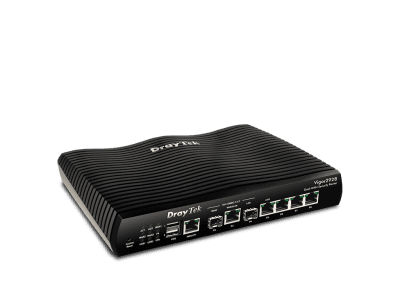 |  | ||
| Fixed Gigabit WAN (P1) | 1 | 1 | ||
| Fixed 10GbE SFP+ WAN (P2) | 1 | 1 | ||
| Switchable 10GbE WAN/LAN (P3) | 1 | 1 | ||
| Fixed 10GbE SFP+ LAN (P4) | 1 | 1 | ||
| Switchable 2.5GbE WAN/LAN (P5) | 1 | 1 | ||
| Fixed LAN Port (P6-P8) | 3 x GbE (RJ-45) | 3 x GbE (RJ-45) | ||
| You can use only two ports at a time from P2 to P4. Also, P2 and P3 cannot both be configured as WAN ports simultaneously. | ||||
| 4G LTE | 2 x USB 2.0 | 2 x USB 2.0 | ||
| Wireless WAN | ||||
| VPN Tunnels | 50 | 50 | ||
| Wireless LAN | Wi-Fi 7, BE7200 | |||
| Wi-Fi Antenna | ||||
| MORE INFO | ||||
Specifications
Performance (gDisplayOff)
| Performance | |
|---|---|
| NAT Session | 60,000 |
| Max. NAT (Mbps) | 9300 |
[DISPLAY OFF] —– MOBILE VIEW
| Performance |
|---|
| NAT Session: 60K |
| Max. NAT (Mbps): 9300 |
WAN (gDisplayOff)
| WAN | |
|---|---|
| Ethernet WAN/LAN Switchable (1 GbE) | 1 |
| Ethernet WAN/LAN Switchable (10 GbE) | 1 |
| Ethernet WAN/LAN Switchable (2.5GbE) | 1 |
| SFP+ (10GbE) | 1 |
| Cellular (via USB) | 2 |
| Wireless WAN (2.4GHz + 5GHz) | * (be model only) |
[DISPLAY OFF] —– MOBILE VIEW
| WAN | |
|---|---|
| Ethernet WAN/LAN Switchable (1 GbE): 1 | |
| Ethernet WAN/LAN Switchable (2.5GbE): 1 | |
| SFP+ (10GbE): 1 | |
| Cellular (via USB): 2 | |
| Wireless WAN (2.4GHz + 5GHz): (be model only) | |
Internet Connection (gDisplayOff)
| Internet Connection | |
|---|---|
| IPv4 | PPPoE, DHCP, Static IP |
| IPv6 | PPP, DHCPv6, Static IPv6, TSPC, 6rd, 6in4 Static Tunnel |
| 802.1p/q Multi-VLAN Tagging | |
| Failover | |
| Load Balancing | IP-based, Session-based |
| Connection Detection | ARP, Ping |
| WAN Data Budget | |
| Dynamic DNS | |
| DrayDDNS | |
[DISPLAY OFF] —– MOBILE VIEW
| Internet Connection | |
|---|---|
| IPv4: PPPoE, DHCP, Static IP | |
| IPv6: PPP, DHCPv6, Static IPv6, TSPC, 6rd, 6in4 Static Tunnel | |
| 802.1p/q Multi-VLAN Tagging | |
| Failover | |
| Load Balancing: IP-based, Session-based | |
| Connection Detection: ARP, Ping | |
| WAN Data Budget | |
| Dynamic DNS | |
| DrayDDNS | |
LAN (gDisplayOff)
| LAN | |
|---|---|
| Fixed LAN (RJ-45, GbE) | 3 |
| WAN/LAN Switchable (RJ-45, 2.5GbE) | 1 |
| Fixed LAN (SFP+, 10GbE) | 1 |
| LAN Subnet | 8 |
| VLAN | 802.1q Tag-based VLAN |
| Max. Number of VLAN | 8 |
| DHCP Server | Multiple IP Subnet, Custom DHCP Options, Bind-IP-to-MAC |
| Wired 802.1x Authentication | |
| Port Mirroring | |
| Local DNS Server | |
| Conditional DNS Forwarding | |
| Hotspot Web Portal (Profile No.) | 4 |
| Hotspot Authentication | Click-Through, Social Login, SMS PIN, RADIUS, External Portal Server |
[DISPLAY OFF] —– MOBILE VIEW
| LAN | |
|---|---|
| Fixed LAN (RJ-45, GbE): 3 | |
| WAN/LAN Switchable (RJ-45, 2.5GbE): 1 | |
| LAN Subnet: 8 | |
| VLAN: 802.1q Tag-based VLAN | |
| Max. Number of VLAN: 8 | |
| DHCP Server: Multiple IP Subnet, Custom DHCP Options, Bind-IP-to-MAC | |
| Wired 802.1x Authentication | |
| Port Mirroring | |
| Local DNS Server | |
| Conditional DNS Forwarding | |
| Hotspot Web Portal (Profile No.): 4 | |
| Hotspot Authentication: Click-Through, Social Login, SMS PIN, RADIUS, External Portal Server | |
Wireless LAN (be model) (gDisplayOff)
| Wireless LAN (be model) | |
|---|---|
| 2.4GHz WLAN | 802.11be 4×4 MU-MIMO |
| 5GHz WLAN | 802.11be 4×4 MU-MIMO |
| Wi-Fi Antenna (External) | 2 |
| Wi-Fi Antenna (Internal) | 4 |
| 2.4GHz Antenna Gain | –dBi |
| 5GHz Antenna Gain | –dBi |
| 2.4GHz Max. Link Rate | 1376Mbps |
| 5GHz Max. Link Rate | 5764Mbps |
| Max. Number of SSIDs (per band) | 8 (4) |
| Security Mode | OWE, WPA, WPA2, WPA2/WPA, WPA3, WPA3/WPA2 |
| Authentication | Pre-Shared Key |
| Wi-Fi 7 | |
| OFDMA | |
| Roaming | Assisted Roaming, Pre-Authentication, 802.11r, 802.11k |
| WPS | WPS Button, PIN Code |
| Access Control | Hide SSID, WLAN Scheduling |
| AirTime Fairness | |
| Band Steering | |
| WMM | |
| Mesh (5GHz Only) | Root |
[DISPLAY OFF] —– MOBILE VIEW
| Wireless LAN (be model) | |
|---|---|
| 2.4GHz WLAN: 802.11be 4×4 MU-MIMO | |
| 5GHz WLAN: 802.11be 4×4 MU-MIMO | |
| Wi-Fi Antenna (External): 2 | |
| Wi-Fi Antenna (Internal): 4 | |
| 2.4GHz Gain: –dBi | |
| 5GHz Gain: –dBi | |
| 2.4GHz Max. Link Rate: 1376Mbps | |
| 5GHz Max. Link Rate: 5764Mbps | |
| Max. Number of SSIDs (per band): 8 (4) | |
| Security Mode: OWE, WPA, WPA2, WPA2/WPA, WPA3, WPA3/WPA2 | |
| Authentication: Pre-Shared Key | |
| Wi-Fi 7 | |
| OFDMA | |
| Roaming: Assisted Roaming, Pre-Authentication, 802.11r, 802.11k | |
| WPS: WPS Button, PIN Code | |
| Access Control: Hide SSID, WLAN Scheduling | |
| AirTime Fairness | |
| Band Steering | |
| WMM | |
| Mesh (5GHz Only): Root | |
Other Ports (gDisplayOff)
| Other Ports | |
|---|---|
| USB | 2 |
| USB Type | 2.0 |
| USB Application | User Management, File Explorer, FTP File Sharing, Device Status, Printer Server, Temperature Sensor, USB WAN |
| SMB File Sharing (Requires external storage) | |
[DISPLAY OFF] —– MOBILE VIEW
| Other Ports | |
|---|---|
| USB: 2 | |
| USB Type: 2.0 | |
| USB Application: User Management File Explorer FTP File Sharing Device Status Printer Server Temperature Sensor USB WAN | |
| SMB File Sharing (Requires external storage) | |
Networking (gDisplayOff)
| Networking | |
|---|---|
| Routing | IPv4 Static Routing, IPv6 Static Routing, Policy Route, Inter-VLAN Route, RIP v1/v2, OSPF(V2/V3), BGP |
| Policy-based Routing | Protocol, IP Address, Port |
| DNS Security (DNSSEC) | |
| IGMP | IGMP v2/v3, IGMP Proxy, IGMP Snooping & Fast Leave |
| Local RADIUS server | |
[DISPLAY OFF] —– MOBILE VIEW
| Networking | |
|---|---|
| Routing: IPv4 Static Route IPv6 Static Route Policy Route Inter-VLAN Route RIP v1/v2 OSPF(V2/V3) BGP | |
| Policy-based Routing: Protocol IP Address Port | |
| DNS Security (DNSSEC): | |
| IGMP: IGMP v2/v3 IGMP Proxy IGMP Snooping & Fast Leave | |
| Local RADIUS server: | |
Bandwidth Management (gDisplayOff)
| Bandwidth Management | |
|---|---|
| Traffic Shaping Policy | |
| IP-based Bandwidth Limit | |
| IP-based Session Limit | |
| QoS (Quality of Service) | IP Address, Port, Application |
| APP QoS | |
| Default Policy | |
| VoIP Prioritization | |
[DISPLAY OFF] —– MOBILE VIEW
| Bandwidth Management | |
|---|---|
| Traffic Shaping Policy | |
| IP-based Bandwidth Limit | |
| IP-based Session Limit | |
| QoS (Quality of Service): IP Address, Port, Application | |
| APP QoS | |
| Default Policy | |
| VoIP Prioritization | |
NAT (gDisplayOff)
| NAT | |
|---|---|
| Port Forwarding | |
| DMZ Host | |
| Port Trigger | |
| ALG (Application Layer Gateway) | SIP, RTSP |
| UPnP | |
[DISPLAY OFF] —– MOBILE VIEW
| NAT | |
|---|---|
| Port Forwarding | |
| DMZ Host | |
| Port Trigger | |
| ALG (Application Layer Gateway): SIP, RTSP | |
| UPnP | |
Management (gDisplayOff)
| Management | |
|---|---|
| Local Service | HTTP, HTTPS, Telnet, SSHv2, FTP, TR-069 |
| Config Backup/Restore | |
| Firmware Upgrade | WUI, TFTP, TR-069 |
| Role-based Privilege | |
| Access Control | Access List, Brute Force Protection |
| Notification Alert | SMS, E-mail |
| SNMP | v1, v2c, v3 |
| Syslog | |
| Virtual AP Controller (Device up to) | 20 |
| Mesh (Number of manageable APs) | 7 (be model only) |
| Virtual Switch Controller | 10 |
| Managed by VigorACS | Since f/w v5.4.0 |
[DISPLAY OFF] —– MOBILE VIEW
| Management | |
|---|---|
| Local Service: HTTP, HTTPS, Telnet, SSH v2, FTP, TR-069 | |
| Config Backup / Restore | |
| Firmware Upgrade: WUI, TFTP, TR-069 | |
| Role-based Privilege | |
| Access Control: Access List, Brute Force Protection | |
| Notification Alert: SMS, E-mail | |
| SNMP: v1, v2c, v3 | |
| Syslog | |
| Virtual AP Controller (Device up to): 20 x VigorAPs | |
| Mesh (Number of manageable APs): 7 (ax model only) | |
| Virtual Switch Controller: 10 | |
| VigorACS Management: Since f/w v5.4.0 | |
Security (gDisplayOff)
| Security | |
|---|---|
| URL/IP Reputation | |
| Threat Protection | |
| Firewall Filter | IP, Content, Traffic |
| Port Knocking | |
| Defense Setup | ARP Spoofing, IP Spoofing |
| MAC Filtering Profile | |
| IPv6 Address Security | |
[DISPLAY OFF] —– MOBILE VIEW
| Security | |
|---|---|
| URL/IP Reputation | |
| Threat Protection | |
| Firewall Filter: IP, Content, Traffic | |
| Port Knocking | |
| Defense Setup: ARP Spoofing, IP Spoofing | |
| MAC Filtering Profile | |
| IPv6 Address Security | |
IAM (gDisplayOff)
| IAM | |
|---|---|
| Users & Groups | |
| Access Policies | |
| Group Policies | |
| Conditional Access Policy | |
| Resources | |
| Account Status | |
| Backup and Restore | |
[DISPLAY OFF] —– MOBILE VIEW
| IAM | |
|---|---|
| Users & Groups | |
| Access Policies | |
| Group Policies | |
| Conditional Access Policy | |
| Resources | |
| Account Status | |
| Backup and Restore | |
VPN (gDisplayOff)
| VPN | |
|---|---|
| Site-to-Site VPN | |
| Teleworker VPN | |
| EasyVPN | |
| Protocols | IPsec, IKEv1/IKEv2, IKEv2-EAP, IPsec-XAuth, OpenVPN, WireGuard |
| Max. VPN Tunnels | 50 |
| IPsec VPN Throughput (AES 256 bits) | 540 Mbps (single-directional) |
| WireGuard VPN Throughput | 85 Mbps (single-directional) |
| User Authentication | Local, RADIUS, TACACS+, mOTP, TOTP |
| IKE Authentication | Pre-Shared Key, X.509 |
| IPsec Authentication | SHA-1, SHA-256 |
| Encryption | DES, 3DES, AES |
| Translate Local Network (Site-to-Site VPN) | |
| Single-Armed VPN | |
| NAT-Traversal (NAT-T) | |
| VPN Matcher | |
| VPN Connection Status | |
| Backup & Restore | |
[DISPLAY OFF] —– MOBILE VIEW
| VPN | |
|---|---|
| Site-to-Site VPN | |
| Teleworker VPN | |
| EasyVPN | |
| Protocols: IPsec IKEv1/IKEv2 IKEv2-EAP IPsec-XAuth OpenVPN WireGuard | |
| Max. VPN Tunnels: 50 | |
| IPsec VPN Throughput (AES 256 bits): 540 Mbps (single-directional) | |
| WireGuard VPN Throughput: 85 Mbps (single-directional) | |
| User Authentication: Local RADIUS TACACS+ mOTP TOTP | |
| IKE Authentication: Pre-Shared Key, X.509 | |
| IPsec Authentication: SHA-1, SHA-256 | |
| Encryption: DES 3DES AES | |
| Translate Local Network (Site-to-Site VPN) | |
| Single-Armed VPN | |
| NAT-Traversal (NAT-T) | |
| VPN Matcher | |
| VPN Connection Status | |
| Backup & Restore | |
Monitoring (gDisplayOff)
| Monitoring | |
|---|---|
| Log Center | |
| WAN | |
| ARP Table | |
| Route Table | |
| DHCP Table | |
| IPv6 TSPC Status | |
| IPv6 Neighbor Table | |
| LLDP Neighbors | |
| DNS Cache Table | |
| Remote DSL Status | |
| SFP Information | |
| PPPoE Pass-Through | |
| Session Table | |
| Running Service | |
[DISPLAY OFF] —– MOBILE VIEW
| Monitoring | |
|---|---|
| Log Center | |
| WAN | |
| ARP Table | |
| Route Table | |
| DHCP Table | |
| IPv6 TSPC Status | |
| IPv6 Neighbor Table | |
| LLDP Neighbors | |
| DNS Cache Table | |
| Remote DSL Status | |
| SFP Information | |
| PPPoE Pass-Through | |
| Session Table | |
| Running Service | |
Physical (gDisplayOff)
| Physical | |
|---|---|
| Power Supply | Vigor2928: DC 12V @ 1.15A Vigor2928be: DC 12V @ 2.8A |
| Max. Power Consumption | Vigor2928: 18 watts Vigor2928be: 33.6 watts |
| Dimension | 241mm x 165mm x 43mm |
| Weight | Vigor2928: 1.26kg Vigor2928be: 1.8kg |
| Operating Temperature | 0 to 45°C |
| Storage Temperature | -25 to 70°C |
| Operating Humidity (non-condensing) | 10 to 90% |
[DISPLAY OFF] —– MOBILE VIEW
| Physical | |
|---|---|
| Power Supply: DC 12V @ 1.15A (Vigor2928) DC 12V @ 2.8A (Vigor2928be) | |
| Max. Power Consumption: 18 watts (Vigor2928) 33.6 watts (Vigor2928be) | |
| Dimension: 241mm x 165mm x 43mm | |
| Weight: 1.26kg (Vigor2928) 1.8kg (Vigor2928be) | |
| Operating Temperature: 0 to 45°C | |
| Storage Temperature: -25 to 70°C | |
| Operating Humidity (non-condensing): 10 to 90% |
Note :
- * : Future Support.
- All specifications are subject to change without notice.
- The throughput figures are maximum, based on DrayTek internal testing with optimal conditions. The actual performance may vary depending on the different network conditions and applications activated.


